" height="133.020195px" id="Pmb3oQVE6" transform="translate(155.31 0.8)" width="88.57999999999998px"/><path d="M 47.61 106.14 C 31.72 106.14 19.64 100.82 11.7 90.34 C 3.93 80.02 0 67.49 0 53.1 C 0 38.71 3.94 26.46 11.69 16 C 19.6 5.38 31.69 0 47.61 0 C 63.53 0 75.63 5.38 83.57 15.99 C 91.32 26.47 95.25 38.95 95.25 53.11 C 95.25 67.27 91.32 80.02 83.57 90.35 C 75.59 100.84 63.49 106.15 47.61 106.15 Z M 47.61 4.48 C 33.18 4.48 22.31 9.25 15.28 18.67 C 8.11 28.34 4.48 39.93 4.48 53.1 C 4.48 66.27 8.11 78.12 15.27 87.64 C 22.31 96.93 33.19 101.65 47.6 101.65 C 62.01 101.65 72.81 97.06 79.99 87.62 C 87.13 78.1 90.76 66.49 90.76 53.09 C 90.76 39.69 87.13 28.33 79.97 18.65 C 72.82 9.11 62.24 4.47 47.6 4.47 Z M 47.56 85.22 C 40.02 85.22 34.12 82.29 30.02 76.49 C 26.12 70.96 24.13 63.1 24.13 53.1 C 24.13 43.1 26.11 35.22 30.02 29.74 C 34.14 23.98 40.04 21.06 47.56 21.06 C 55.08 21.06 60.96 23.98 65.02 29.75 C 68.91 35.2 70.89 43.06 70.89 53.1 C 70.89 63.14 68.92 70.99 65.02 76.49 C 60.98 82.28 55.11 85.22 47.56 85.22 Z M 47.56 25.54 C 41.49 25.54 36.95 27.77 33.67 32.35 C 30.31 37.06 28.61 44.04 28.61 53.11 C 28.61 62.18 30.31 69.16 33.67 73.91 C 36.93 78.51 41.47 80.75 47.55 80.75 C 53.63 80.75 58.14 78.52 61.34 73.93 C 64.7 69.19 66.39 62.19 66.39 53.11 C 66.39 44.03 64.7 37.04 61.36 32.35 C 58.13 27.77 53.62 25.55 47.56 25.55 Z" fill="rgb(77, 78, 83)" height="106.15039999999999px" id="ER7nj0uz3" transform="translate(251.4 32.33)" width="95.24999999999997px"/><path d="M 88.87 102.13 L 59.34 102.13 L 59.34 41.89 C 59.34 37.25 58.76 33.69 57.6 31.3 C 55.6 27.2 51.8 25.21 45.99 25.21 C 38.7 25.21 33.83 28.29 31.12 34.63 C 29.67 38.06 28.93 42.66 28.93 48.28 L 28.93 102.14 L 0 102.14 L 0 2.46 L 28.14 2.46 L 28.14 11.59 C 29.97 9.3 31.72 7.53 33.44 6.23 C 38.8 2.1 45.67 0 53.82 0 C 63.93 0 72.36 2.78 78.89 8.26 C 85.51 13.87 88.86 23.09 88.86 35.67 L 88.86 102.12 Z M 63.83 97.65 L 84.38 97.65 L 84.38 35.68 C 84.38 24.48 81.56 16.4 76.01 11.69 C 70.32 6.91 62.86 4.48 53.83 4.48 C 46.69 4.48 40.74 6.27 36.17 9.79 C 33.66 11.7 30.84 15.07 27.79 19.83 L 23.66 26.26 L 23.66 6.94 L 4.49 6.94 L 4.49 97.65 L 24.44 97.65 L 24.44 48.28 C 24.44 41.97 25.28 36.93 26.99 32.88 C 30.44 24.82 36.82 20.74 45.98 20.74 C 53.57 20.74 58.83 23.64 61.62 29.34 C 63.09 32.4 63.82 36.5 63.82 41.89 L 63.82 97.65 Z" fill="rgb(77, 78, 83)" height="102.1403px" id="F7RAtrgvn" transform="translate(365.92 31.68)" width="88.87px"/><path d="M 0 44.37 L 0 26.61 L 13.02 26.61 L 13.02 0 L 37.22 0 L 37.22 26.61 L 52.39 26.61 L 52.39 44.37 L 37.22 44.37 L 37.22 94.78 C 37.22 98.68 37.71 101.12 38.67 102.07 C 39.67 103.05 42.62 103.52 47.58 103.52 C 48.34 103.52 49.11 103.48 49.94 103.47 C 50.78 103.46 51.6 103.42 52.39 103.33 L 52.39 121.97 L 40.83 122.43 C 29.26 122.82 21.38 120.8 17.14 116.29 C 14.4 113.43 13.02 109.04 13.02 103.08 L 13.02 44.37 Z" fill="rgb(77, 78, 83)" height="122.47729173181735px" id="F_GEdFCRb" transform="translate(473.46 10.48)" width="52.39000000000004px"/><path d="M 68.25 4.49 C 74.77 7.48 80.17 12.17 84.42 18.59 C 88.23 24.25 90.72 30.82 91.85 38.29 C 92.5 42.68 92.75 48.98 92.66 57.24 L 24.58 57.24 C 24.96 66.78 28.22 73.5 34.37 77.35 C 38.09 79.73 42.59 80.94 47.84 80.94 C 53.39 80.94 57.93 79.5 61.41 76.57 C 63.31 75.01 64.96 72.79 66.42 69.99 L 91.39 69.99 C 90.73 75.66 87.7 81.42 82.32 87.24 C 73.95 96.51 62.24 101.14 47.16 101.14 C 34.72 101.14 23.74 97.23 14.25 89.42 C 4.72 81.62 0 68.88 0 51.25 C 0 34.73 4.27 22.04 12.87 13.23 C 21.44 4.41 32.58 0 46.28 0 C 54.43 0 61.73 1.51 68.26 4.49 M 31.68 26.02 C 28.21 29.66 26.08 34.58 25.17 40.79 L 67.27 40.79 C 66.83 34.17 64.65 29.14 60.75 25.71 C 56.86 22.28 52.05 20.58 46.26 20.58 C 40 20.58 35.15 22.38 31.68 26.02 Z" fill="rgb(77, 78, 83)" height="101.14030000000001px" id="jlEGzBEnJ" transform="translate(545.43 33.66)" width="92.67773092046734px"/><path d="M 0 0 L 24 0 L 24 69.59 L 54.85 33.6 L 85.22 33.6 L 51.73 69.14 L 86.54 128.54 L 56.77 128.54 L 34.12 87.79 L 24 98.54 L 24 128.54 L 0 128.54 Z" fill="rgb(77, 78, 83)" height="128.53996px" id="ZuKYrOx4n" transform="translate(661.04 3.04)" width="86.54000000000008px"/><path d="M 77.47 46.46 L 77.47 41 L 134.48 41 L 134.48 0 L 0 0 L 0 134.45 L 134.48 134.45 L 134.48 98.11 L 77.47 98.11 L 77.47 92.64 L 134.48 92.64 L 134.48 85.2 L 77.47 85.2 L 77.47 79.74 L 134.48 79.74 L 134.48 72.28 L 77.47 72.28 L 77.47 66.83 L 134.48 66.83 L 134.48 59.37 L 77.47 59.37 L 77.47 53.91 L 134.48 53.91 L 134.48 46.46 Z" fill="rgb(231, 0, 51)" height="134.45px" id="GmrYTTGI7" width="134.48px"/></g></svg>)
Case study
Replicating the "Socratic Method" in a Virtual Law Classroom

Case study
Replicating the "Socratic Method" in a Virtual Law Classroom
Case study
Replicating the "Socratic Method" in a Virtual Law Classroom
Challenge: Delivering a realistic, high-engagement digital version of the traditional law school classroom.
The Challenge
Law school education relies on a lively, real-time dialogue between teachers and students, known as the Socratic method. Students are often called upon to explain and justify their reasoning in front of their peers. Traditional web conferencing tools, which rely on the passive presentation of slide content, were deemed ineffective for this fast-paced interaction. When NCCU’s School of Law introduced distance education, they challenged the team to create a digital environment that could mimic the traditional classroom experience.
The Solution: A Simulated Law Office Environment
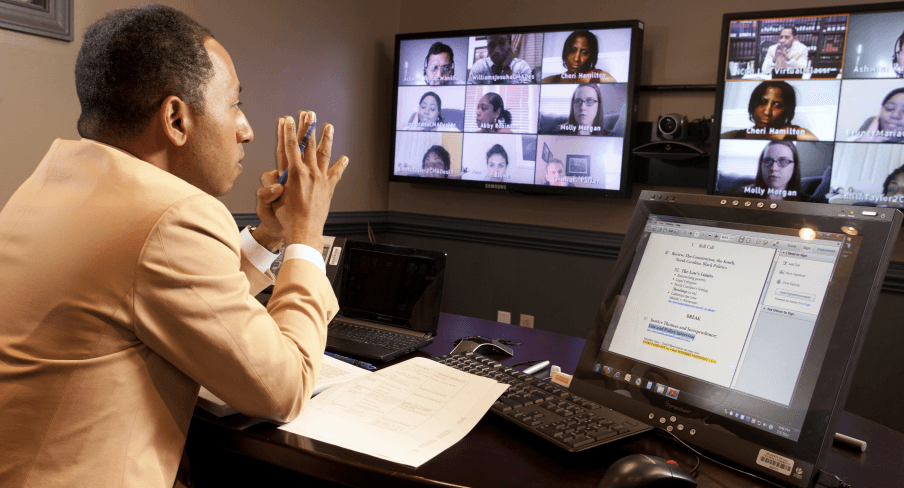
The implemented solution was a Virtual Classroom designed to place the instructor in a simulated law office setting. This environment was integrated with advanced teaching tools to allow for seamless document sharing and real-time markup.
Key Features of the System:
Near Life-Size Interaction: Wall-mounted video displays allow the instructor to see and interact with up to 32 remote students at near life-size proportions.
Voice-Activated Switching: The system automatically switches video focus to a student when they are called upon to answer a question.
Virtual Seating Chart: Student names are clearly visible to the instructor, creating a familiar seating arrangement that aids in classroom management.
Total Session Control: An intuitive touch panel provides the instructor with total control over the technology, including the document camera and laptop interfaces.
Hardware Highlights
Custom AV furniture with integrated system control.
Dual wall-mounted video displays with eye-level HD pan/tilt/zoom cameras.
Dual Polycom HD room codecs and a Polycom videoconference bridge.
Integrated presentation tools including a Windows computer and touch-sensitive display with a stylus.
The Impact
The result is a truly synchronous experience that is both easy for instructors to operate and highly engaging for remote students.
"We waited until the technology became stable enough to mimic a traditional classroom experience. Kontek helped us deliver a synchronous solution in a way that’s easy for the instructor to control, and very engaging for our remote students."
— Gregory W. Clinton, Sr., Director of IT and Facilities, NCCU School of Law.
Challenge: Delivering a realistic, high-engagement digital version of the traditional law school classroom.
The Challenge
Law school education relies on a lively, real-time dialogue between teachers and students, known as the Socratic method. Students are often called upon to explain and justify their reasoning in front of their peers. Traditional web conferencing tools, which rely on the passive presentation of slide content, were deemed ineffective for this fast-paced interaction. When NCCU’s School of Law introduced distance education, they challenged the team to create a digital environment that could mimic the traditional classroom experience.
The Solution: A Simulated Law Office Environment
The implemented solution was a Virtual Classroom designed to place the instructor in a simulated law office setting. This environment was integrated with advanced teaching tools to allow for seamless document sharing and real-time markup.
Key Features of the System:
Near Life-Size Interaction: Wall-mounted video displays allow the instructor to see and interact with up to 32 remote students at near life-size proportions.
Voice-Activated Switching: The system automatically switches video focus to a student when they are called upon to answer a question.
Virtual Seating Chart: Student names are clearly visible to the instructor, creating a familiar seating arrangement that aids in classroom management.
Total Session Control: An intuitive touch panel provides the instructor with total control over the technology, including the document camera and laptop interfaces.
Hardware Highlights
Custom AV furniture with integrated system control.
Dual wall-mounted video displays with eye-level HD pan/tilt/zoom cameras.
Dual Polycom HD room codecs and a Polycom videoconference bridge.
Integrated presentation tools including a Windows computer and touch-sensitive display with a stylus.
The Impact
The result is a truly synchronous experience that is both easy for instructors to operate and highly engaging for remote students.
"We waited until the technology became stable enough to mimic a traditional classroom experience. Kontek helped us deliver a synchronous solution in a way that’s easy for the instructor to control, and very engaging for our remote students."
— Gregory W. Clinton, Sr., Director of IT and Facilities, NCCU School of Law.
Challenge: Delivering a realistic, high-engagement digital version of the traditional law school classroom.
The Challenge
Law school education relies on a lively, real-time dialogue between teachers and students, known as the Socratic method. Students are often called upon to explain and justify their reasoning in front of their peers. Traditional web conferencing tools, which rely on the passive presentation of slide content, were deemed ineffective for this fast-paced interaction. When NCCU’s School of Law introduced distance education, they challenged the team to create a digital environment that could mimic the traditional classroom experience.
The Solution: A Simulated Law Office Environment
The implemented solution was a Virtual Classroom designed to place the instructor in a simulated law office setting. This environment was integrated with advanced teaching tools to allow for seamless document sharing and real-time markup.
Key Features of the System:
Near Life-Size Interaction: Wall-mounted video displays allow the instructor to see and interact with up to 32 remote students at near life-size proportions.
Voice-Activated Switching: The system automatically switches video focus to a student when they are called upon to answer a question.
Virtual Seating Chart: Student names are clearly visible to the instructor, creating a familiar seating arrangement that aids in classroom management.
Total Session Control: An intuitive touch panel provides the instructor with total control over the technology, including the document camera and laptop interfaces.
Hardware Highlights
Custom AV furniture with integrated system control.
Dual wall-mounted video displays with eye-level HD pan/tilt/zoom cameras.
Dual Polycom HD room codecs and a Polycom videoconference bridge.
Integrated presentation tools including a Windows computer and touch-sensitive display with a stylus.
The Impact
The result is a truly synchronous experience that is both easy for instructors to operate and highly engaging for remote students.
"We waited until the technology became stable enough to mimic a traditional classroom experience. Kontek helped us deliver a synchronous solution in a way that’s easy for the instructor to control, and very engaging for our remote students."
— Gregory W. Clinton, Sr., Director of IT and Facilities, NCCU School of Law.
Related
Trusted by innovators who redefine communication








Trusted by innovators who redefine communication
Trusted by innovators who redefine communication
Let’s build your dream AV project together.
Strategic, precise guidance to turn communication goals into systems that perform where it matters most.

Get pro AV insights.
Get pro AV insights.